Emacs is modular enough to wear Apple glass
Ghostty is a pretty fine terminal. I had it with the following configuration:
background-opacity = 0.01
background-blur = macos-glass-regular
which under Ivan Aivazovsky's "Darial Gorge" as a desktop wallpaper, this config makes it look something like this:
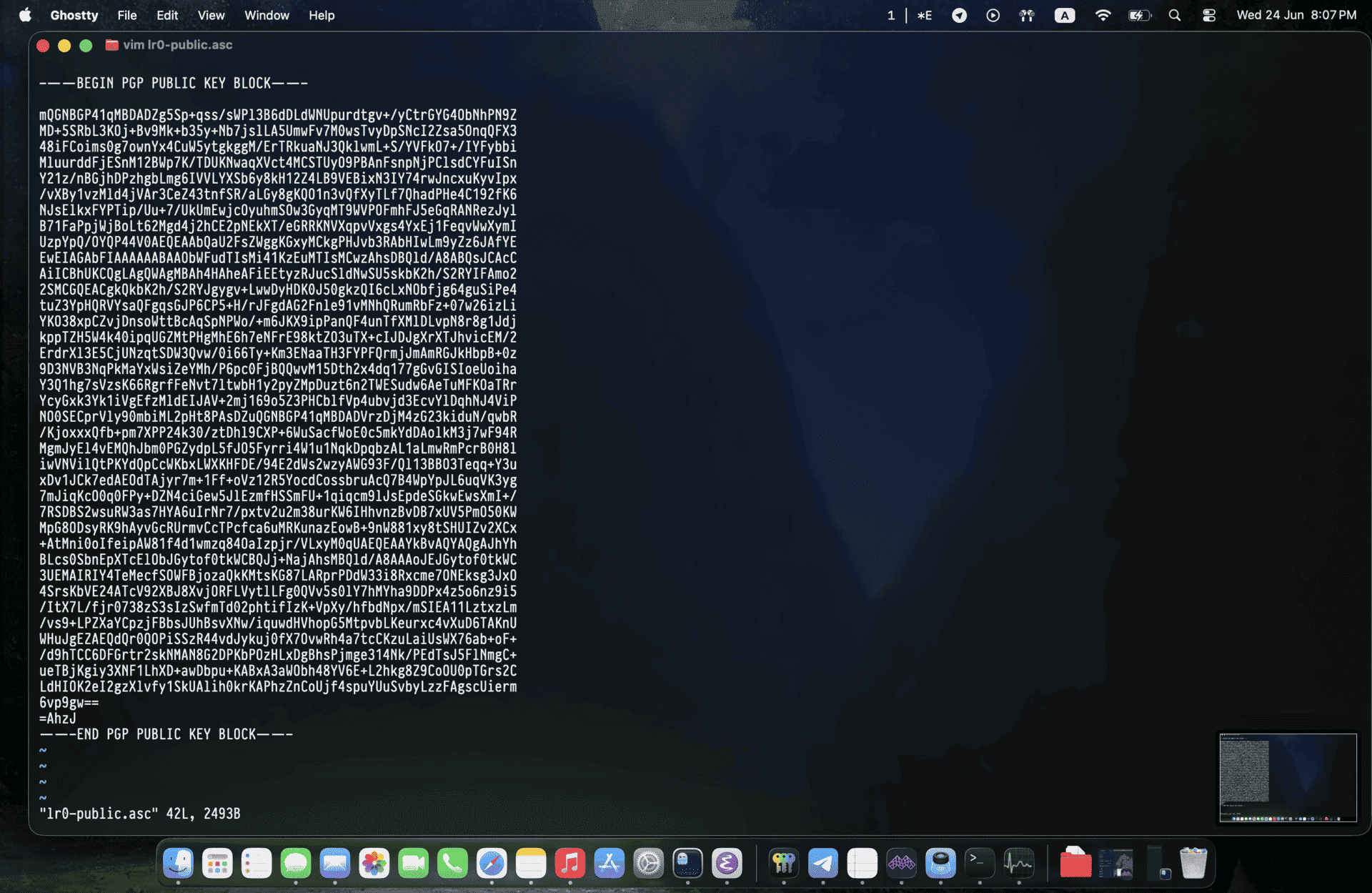
I'm not the biggest fan of Apple glass and many other changes introduced to the UI in the latest update, however, as I showed before, the inconsistency in the new OS update upsets me much more than the terrible UI decisions, which was not the case in previous major updates by Apple11. The move away from skeuomorphism in iOS 7, for example, was much more complete on the system side than this one — that's to say, all of Apple's own system apps adopted the change within the release. That is not the case now: many of Apple's own apps still haven't adopted it, let alone the majority of devs, who either don't care to support the change or refuse to adopt it because they find it ugly..
But again, I love consistency and native feel, ghostty does this nicely, and I wanted this in Emacs too, whose vterm I use interchangeably with ghostty from time to time.
The first attempt was to use the existing frame transparency patch from emacs-plus@31. That patch gives Emacs alpha-background, ns-background-blur, and ns-alpha-elements. You can make the default face, fringes, glyph backgrounds, boxes, and relief lines render with a chosen alpha. But that's far from enough to reach the effects Ghostty makes. The problem is that alpha-background is still drawing Emacs with a transparent
background. At 0.01, the editor is almost fully see-through. If there is no
native material behind it, the result is just absence. The titlebar made this
especially visible:

The second problem is that stock Emacs does not have Apple's glass material (obviously), and the macOS blur controls I needed are not in stock Emacs either. The frame-transparency patch's three parameters are:
alpha-background
ns-background-blur
ns-alpha-elements
As documented, the first one controls the alpha used for the frame background. The second calls the private CGS blur API to set a window background blur radius. The third chooses which parts of the Emacs drawing pipeline should use that alpha. In a nutshell, Emacs only needs to have a bit more frame parameters.
This patch is already useful for a classic translucent Emacs. A fallback glass configuration can be:
(set-frame-parameter nil 'alpha-background 0.70)
(set-frame-parameter nil 'ns-background-blur 30)
(set-frame-parameter nil 'ns-alpha-elements '(ns-alpha-all))
Here's the result you get with this:
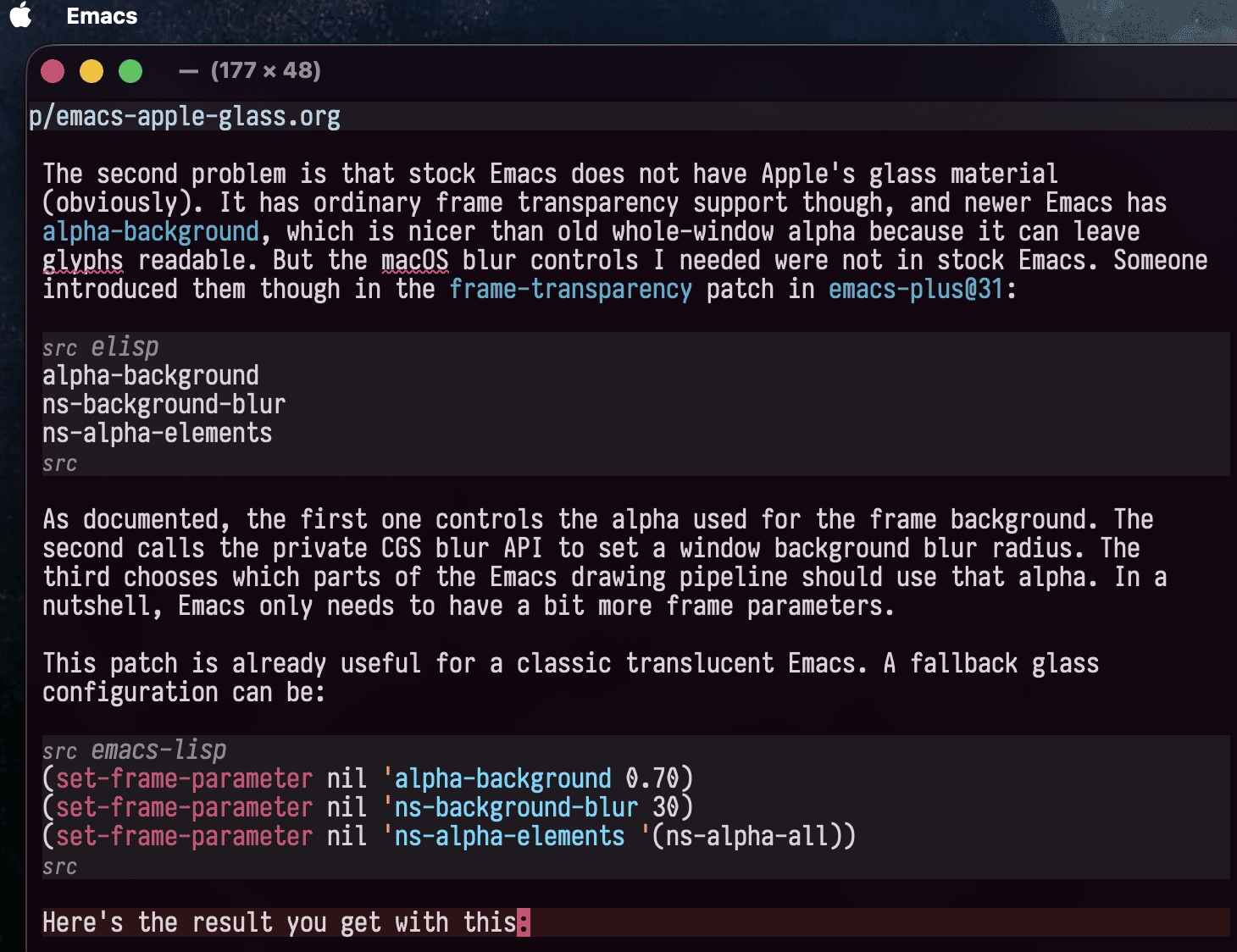
Acceptable yet far from what I want. The frame background and selected-face fills are still fully transparent, the same desktop-through problem as before, just milder.
To achieve this, it needed, as mentioned, more parameters.
The regular preset in Lisp becomes data:
(setq salih/alpha-background 0.01
      salih/ns-background-blur 0
      salih/ns-alpha-elements '(ns-alpha-all)
      salih/ns-glass-material 'regular
      salih/ns-glass-tint-opacity 0.05
      salih/ns-glass-saturation 1.4
      salih/ns-glass-inactive-opacity 0.05
      salih/ns-glass-corner-radius 2
      salih/ns-transparent-titlebar t)
The alpha-background value was put at Ghostty's effective background-opacity value. The CGS blur radius stays at zero for the native glass path, since the material is an AppKit view; it is only used as a fallback for non-native builds.
Each parameter has a narrow job:
| parameter | role |
|---|---|
ns-glass-material | Select regular, clear, visual-effect, or nil. |
ns-glass-tint-opacity | Apply a theme-derived tint to the native material. |
ns-glass-saturation | Saturate the inactive overlay color without touching faces. |
ns-glass-inactive-opacity | Control how much tint is shown when the window is inactive. |
ns-glass-corner-radius | Let the native glass view follow the rounded frame shape. |
The relevant storage is:
int ns_glass_material;
double ns_glass_tint_opacity;
double ns_glass_saturation;
double ns_glass_inactive_opacity;
double ns_glass_corner_radius;
The Lisp values map to enum:
enum ns_glass_material
  {
    ns_glass_material_none = 0,
    ns_glass_material_regular,
    ns_glass_material_clear,
    ns_glass_material_visual_effect
  };
The central native function is ns_update_glass_material. It does three jobs:
- remove the glass views when
ns-glass-materialis nil; - create either an
NSGlassEffectViewor anNSVisualEffectView; - keep an overlay in sync with the frame's current background color.
The tint color comes from Emacs' current frame background:
NSColor *color = f->output_data.ns->background_color;Which keeps the implementation theme-agnostic (although I felt it's a bit off with light themes that have whitish backgrounds). The native layer only samples it and uses it as the material tint.
My first version inserted the effect view into the content view:
container = [window contentView];That mostly worked for the editor area, but it exposed an AppKit boundary that I was not aware of. On macOS, the titlebar is not another line inside Emacs' content view.
When ns-transparent-titlebar is enabled, AppKit lets the titlebar area show
through. If the glass view only exists below [window contentView], the
titlebar has no material behind it and it becomes raw desktop transparency. If
ns-transparent-titlebar is disabled, the titlebar becomes opaque native
chrome.
But I could move the material down one level in the NS view hierarchy;
NSWindow
  frame view
    titlebar area
    content view
      EmacsView
Which does the trick, the glass view needs to live under the frame view so the titlebar has material behind it, but it still needs to be ordered below the content view so Emacs draws normally. That means using the content view's superview as the container when it exists, and using the content view itself as the ordering boundary:
static NSView *
ns_glass_container_view (NSWindow *window)
{
  NSView *content_view = [window contentView];
  NSView *frame_view = [content_view superview];

  return frame_view != nil ? frame_view : content_view;
}

static NSView *
ns_glass_relative_view (NSWindow *window, EmacsView *emacs_view)
{
  NSView *content_view = [window contentView];

  return [content_view superview] != nil ? content_view : emacs_view;
}
Then insertion becomes:
ns_insert_glass_view (container, effect_view, relative_view, NSWindowBelow);It also lets ns-transparent-titlebar stay enabled, which is the only
way the titlebar can visually join the rest of the frame.
There is a second small detail here. If an existing glass view was created under the old container, the update path removes and recreates it:
if (effect_view != nil
    && ([effect_view superview] != container
        || wants_native_glass != ns_glass_view_is_native_glass (effect_view)))
  {
    ns_remove_glass_material (f);
    effect_view = nil;
  }
That made frame updates reliable while switching styles or reloading the config.
I noticed that Ghostty's glass has more body than pure transparency. The patch handles that with two separate mechanisms.
For native glass, the AppKit view gets the style and tint:
glass_view.style =
  FRAME_NS_GLASS_MATERIAL (f) == ns_glass_material_clear
  ? NSGlassEffectViewStyleClear
  : NSGlassEffectViewStyleRegular;
glass_view.tintColor = [base_color colorWithAlphaComponent:tint_opacity];
glass_view.cornerRadius = corner_radius;
For inactive windows, a plain overlay view is placed above the material and below Emacs' content. Its color is derived from the frame background, with a saturation multiplier:
overlay_color = ns_glass_color_adjusting_saturation (base_color, saturation);
overlay_view.layer.backgroundColor = [overlay_color CGColor];
For the regular preset I ended up using:
:tint-opacity 0.05
:saturation 1.4
:inactive-opacity 0.05
:corner-radius 2
This mainly adds saturation. An important detail is where the saturation happens: at first I tried applying it to the faces, which made the implementation rather complex and buggy (you have to predict the outcome of mixing the theme's original faces, the faces you add, and the glass effect). Instead, it is applied to a native overlay color derived from the frame background. That gives the material a bit of the richer Ghostty look while the theme remains the owner of syntax, modeline, fringe, and minibuffer colors.
The Elisp needed only translates a preset into frame parameters and applies them whenever themes or frames change.
The frame parameter set is assembled like this:
(append
 (salih/--theme-background-frame-parameters)
 `((ns-transparent-titlebar . ,salih/ns-transparent-titlebar)
   (alpha-background . ,(salih/--effective-alpha-background))
   (ns-background-blur . ,(salih/--effective-background-blur))
   (ns-alpha-elements . ,salih/ns-alpha-elements))
 (salih/--native-glass-frame-parameters))
Theme background is included, but not hard-coded. The helper reads
(face-background 'default nil t) and, if it is specified, uses that value as
the frame background.
The hooks are the usual frame lifecycle points (I use doom).
(add-hook 'doom-load-theme-hook       #'salih/--apply-glass)
(add-hook 'after-make-frame-functions #'salih/--apply-glass)
(unless (daemonp)
  (add-hook 'window-setup-hook        #'salih/--apply-glass))
Homebrew's emacs-plus tap already has the machinery for local build patches.
The build file is:
patches:
  - frame-transparency
  - ns-glass-effect:
      url: ~/.config/emacs-plus/ns-glass-effect.patch
      sha256: eb49e53d5efe6e92066351796b05d7a718074bbfd0833571eb835414f7ced565
ns-glass-effect.patch assumes the symbols and hooks added by frame-transparency already
exist, especially ns-background-blur, ns-alpha-elements, and ns_update_background_blur.
brew tap d12frosted/emacs-plus
HOMEBREW_NO_AUTO_UPDATE=1 brew reinstall emacs-plus@31 --build-from-source
brew postinstall d12frosted/emacs-plus/emacs-plus@31
After building, there is one macOS-specific footgun. The emacs shell wrapper
looks in /Applications/Emacs.app before the Cellar app. If /Applications has
an older bundle, the rebuilt binary exists but is not the one you launch.
I synced the rebuilt app explicitly:
rsync -a --delete /opt/homebrew/opt/emacs-plus@31/Emacs.app/ /Applications/Emacs.app/
rsync -a --delete "/opt/homebrew/opt/emacs-plus@31/Emacs Client.app/" "/Applications/Emacs Client.app/"
Then I verified the result at the binary level:
strings /Applications/Emacs.app/Contents/MacOS/Emacs \
  | rg 'ns-glass-material|NSGlassEffectView|ns-background-blur'

codesign --verify --deep --strict --verbose=2 /Applications/Emacs.app

emacs --version
I uploaded the patch, and you can use it;
brew tap larrasket/emacs-liquid-glass
brew emacs-liquid-glass install
That command copies the patch and build config into ~/.config/emacs-plus,
taps d12frosted/emacs-plus for the underlying formula, rebuilds
emacs-plus@31, runs postinstall, and syncs the app bundles. It also supports:
brew emacs-liquid-glass install --no-copy-appIf you do not want it to touch /Applications.
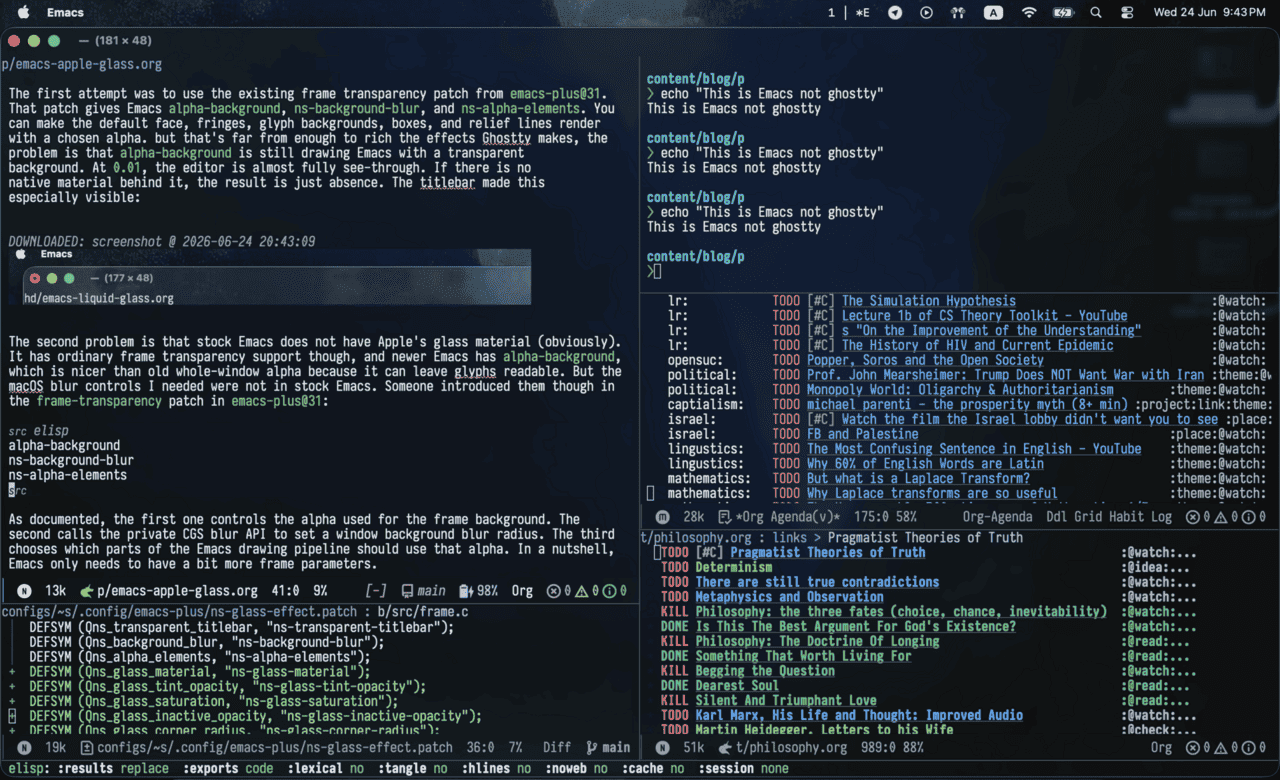
And here's what the result looks like:
#Emacs #macOS #Programming
Footnotes
The move away from skeuomorphism in iOS 7, for example, was much more complete on the system side than this one — that's to say, all of Apple's own system apps adopted the change within the release. That is not the case now: many of Apple's own apps still haven't adopted it, let alone the majority of devs, who either don't care to support the change or refuse to adopt it because they find it ugly.